First BPMN process
With the engine running from the previous chapter, you'll now put it to work — talking to it over its REST and gRPC APIs, exactly as your own code will. By the end you'll have deployed a process, written a worker that does real work, and watched an instance run to completion.
The engine executes business processes described as BPMN diagrams. A process definition is the blueprint; a running copy of it is a process instance; a job is the unit of work the engine creates when an instance reaches a task; a worker is a program you write that carries out a step by taking jobs. That's enough for this tutorial — for the full picture, see BPM Concepts.
Coming from Camunda or Zeebe? This is the familiar external-worker model over gRPC; skim the terminology mapping and read straight on.
What you'll build
You'll run a minimal process (first-bpmn-process.bpmn): a single service task, Log Greeting. When an instance reaches that task, the engine creates a job and waits. Nothing happens until a worker — which you'll write — connects, picks the job up, reads a variable, and prints a greeting.
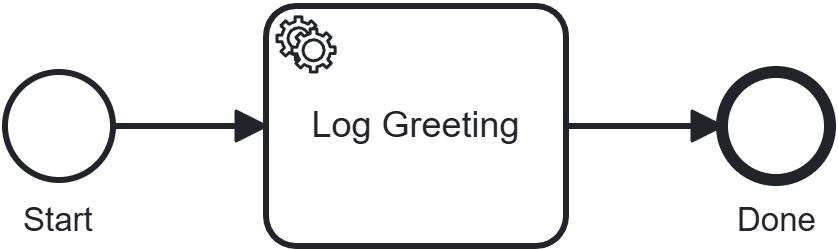
That "the engine creates a job and waits for your worker" mechanic is the heart of ZenBPM — this tutorial exists mainly to make it concrete.
Prerequisites
- The engine running locally and the examples repo cloned — see Run the engine
curl— or any HTTP client- For the worker (Step 3), either Java 17+ with Maven or Go 1.22+
Step 1: Deploy a process
A process definition is a .bpmn file. This chapter's process is (first-bpmn-process.bpmn) in the repo you cloned. From getting-started/, move into the chapter folder:
cd 02-first-bpmn-process
Deploy it with a multipart upload:
curl -X POST http://localhost:8080/v1/process-definitions \
  -F "resource=@first-bpmn-process.bpmn"
The response contains a processDefinitionKey — a generated number that uniquely identifies this deployed definition. Note it; you'll start an instance from it next.
{ "processDefinitionKey": 4503599627370498 }
The examples below use this exact key — it's what a freshly started engine with nothing else deployed returns for the first definition. If you've deployed anything else first, or you're picking this tutorial back up, use the key your own response actually returned instead.
Step 2: Start an instance (and watch it wait)
Starting an instance asks the engine to execute one copy of the definition. Use the key from Step 1:
curl -X POST http://localhost:8080/v1/process-instances \
  -H "Content-Type: application/json" \
  -d '{"processDefinitionKey": 4503599627370498, "variables": {}}'
You get back a processInstanceKey and a state of active:
{
  "key": 4503599627370501,
  "processDefinitionKey": 4503599627370498,
  "state": "active"
}
Query the instance by its key:
curl http://localhost:8080/v1/process-instances/4503599627370501
It's still active — the token has reached the Log Greeting service task, the engine has created a job for it, and there it sits. The engine will never run your business logic itself; it's waiting for a worker to take the job. That's what you'll build now.
Step 3: Write a worker
A worker connects to the engine over gRPC, subscribes to a job type, and for each job: reads the variables, does the work, and reports completion. This process's service task creates jobs of type log-worker; the work is simply to print the log variable.
ZenBPM ships officially supported clients for Java and Go, and this chapter includes a ready-to-run worker project in each (the java/ and go/ folders of getting-started/02-first-bpmn-process). Pick your language:
- Java
- Go
The Java client is a Spring Boot starter: you declare a worker as a bean method annotated with @JobWorker, and the starter connects to the engine on startup.
The client is on Maven Central under org.pbinitiative.zenbpm, versioned in step with the engine (1.4.0). Here is a complete, copy-pasteable pom.xml:
<?xml version="1.0" encoding="UTF-8"?>
<project xmlns="http://maven.apache.org/POM/4.0.0"
         xmlns:xsi="http://www.w3.org/2001/XMLSchema-instance"
         xsi:schemaLocation="http://maven.apache.org/POM/4.0.0 https://maven.apache.org/xsd/maven-4.0.0.xsd">
  <modelVersion>4.0.0</modelVersion>

  <parent>
    <groupId>org.springframework.boot</groupId>
    <artifactId>spring-boot-starter-parent</artifactId>
    <version>3.3.4</version>
    <relativePath/>
  </parent>

  <groupId>org.pbinitiative.examples</groupId>
  <artifactId>first-bpmn-process-worker</artifactId>
  <version>1.0.0</version>

  <properties>
    <java.version>17</java.version>
    <zenbpm.version>1.4.0</zenbpm.version>
    <opentelemetry.version>1.58.0</opentelemetry.version>
  </properties>

  <dependencyManagement>
    <dependencies>
      <!-- The ZenBPM starter needs a newer OpenTelemetry than Spring Boot 3.3.x manages. -->
      <dependency>
        <groupId>io.opentelemetry</groupId>
        <artifactId>opentelemetry-bom</artifactId>
        <version>${opentelemetry.version}</version>
        <type>pom</type>
        <scope>import</scope>
      </dependency>
    </dependencies>
  </dependencyManagement>

  <dependencies>
    <!-- Spring Boot core. The ZenBPM starter declares spring-boot-autoconfigure as optional (not transitive), so the application must provide Spring Boot itself. -->
    <dependency>
      <groupId>org.springframework.boot</groupId>
      <artifactId>spring-boot-starter</artifactId>
    </dependency>
    <!-- ZenBPM Spring Boot starter: provides @JobWorker and auto-connects on startup. -->
    <dependency>
      <groupId>org.pbinitiative.zenbpm</groupId>
      <artifactId>zenbpm-spring-boot-starter</artifactId>
      <version>${zenbpm.version}</version>
    </dependency>
    <!-- Required for gRPC job workers. -->
    <dependency>
      <groupId>io.grpc</groupId>
      <artifactId>grpc-netty-shaded</artifactId>
      <version>1.80.0</version>
    </dependency>
  </dependencies>

  <build>
    <plugins>
      <plugin>
        <groupId>org.springframework.boot</groupId>
        <artifactId>spring-boot-maven-plugin</artifactId>
      </plugin>
    </plugins>
  </build>
</project>
Point the starter at your engine in application.yml:
zenbpm:
  grpcHost: localhost
  grpcPort: 9090
  grpcPlaintext: true
  jobWorkerEnabled: true
Declare the worker. The method subscribes to the log-worker job type, reads the log variable, and prints it:
import org.springframework.stereotype.Component;
import org.pbinitiative.zenbpm.grpc.JobWorker;
import org.pbinitiative.zenbpm.grpc.JobContext;
import java.util.Map;

@Component
public class LogWorker {
  @JobWorker("log-worker")
  public Map<String, Object> handleJob(JobContext ctx) {
    System.out.println("[log-worker] " + ctx.getVariables().get("log"));
    return Map.of(); // no output variables; job complete
  }
}
This worker is ready in the chapter's java/ folder. From 02-first-bpmn-process/, start it:
cd java
mvn spring-boot:run
The Go client is part of the engine module (github.com/pbinitiative/zenbpm/pkg/zenclient). Register a worker with a handler function:
package main

import (
	"context"
	"fmt"

	"github.com/pbinitiative/zenbpm/pkg/zenclient"
	"github.com/pbinitiative/zenbpm/pkg/zenclient/proto"
	"google.golang.org/grpc"
	"google.golang.org/grpc/credentials/insecure"
)

func main() {
	conn, err := grpc.NewClient(
		"127.0.0.1:9090",
		grpc.WithTransportCredentials(insecure.NewCredentials()),
	)
	if err != nil {
		panic(err)
	}
	defer conn.Close()

	zen := zenclient.NewGrpc(conn)

	// Subscribe to "log-worker" jobs.
	_, err = zen.RegisterWorker(context.Background(), "first-bpmn-process-worker",
		func(ctx context.Context, job *proto.WaitingJob) (map[string]any, *zenclient.WorkerError) {
			vars := job.GetVariables()
			fmt.Printf("[log-worker] %v\n", vars["log"])
			return map[string]any{}, nil // no output variables; job complete
		},
		"log-worker",
	)
	if err != nil {
		panic(err)
	}

	select {} // keep the worker running
}
This worker is ready in the chapter's go/ folder. From 02-first-bpmn-process/, start it:
cd go
go mod tidy
go run .
The worker connects, finds the waiting job from Step 2, and prints:
[log-worker] Hello, World!
The moment it reports the job complete, the engine advances the token past the service task to the end event.
Full dependency coordinates, configuration options, and REST/gRPC usage for both languages are in the Client Libraries reference.
Step 4: Observe completion
Query the same instance again:
curl http://localhost:8080/v1/process-instances/4503599627370501
Its state is now completed. You just watched the full engine loop: a token entered the process, waited at a service task, your worker did the work, and the instance finished — driven entirely through the API, exactly as your own application would drive it.
Step 5: Make it yours
Change the greeting and redeploy to see versioning in action. In first-bpmn-process.bpmn, find the input mapping that sets log to Hello, World! and change the text. Redeploy the same file:
curl -X POST http://localhost:8080/v1/process-definitions \
  -F "resource=@first-bpmn-process.bpmn"
Because the process id is unchanged, the engine stores this as a new version and returns a new processDefinitionKey. Start an instance against the new key (Step 2) with your worker still running — your new greeting prints. Older instances keep running on the version they started with.
Clean up
Stop the worker (Ctrl+C), then move back up to the getting-started/ folder and stop the engine:
cd ../..
docker compose down
Next steps
- Understand the model. BPM Concepts — definitions, instances, tokens, and the job/worker mechanic in one short read.
- Service tasks. Look at the detailed Service Task reference overview.
- More workers.
examples/workers/shows several workers in one Go project. - The APIs in full. REST (OpenAPI) and the gRPC proto.
- Engine internals. Architecture.